

Running a cricket player auction for your local tournament is simpler than it looks — if you fix four decisions before auction day: who can play, how many teams there are, what each team's purse is, and how big a squad each team can hold. Everything else (registration, base price, bidding order) flows from those four. This guide walks through each step in order, with the mistakes first-time organizers make most.
New to the format? Start with What Is a Sports Player Auction? — it covers the auction sequence end-to-end. This guide is the organizer's playbook for actually running one.
What do you need to decide before the auction?
Four decisions. Write them down and share them with every team owner before registration opens — most auction-day arguments come from rules that were never written down.
1. Who can register (eligibility). Age group, locality ("players from these 5 wards"), skill level, or open to all. For tennis-ball and box-cricket tournaments, also decide: leather-ball players allowed, or tennis-ball only? Put it in writing.
2. Teams and owners. How many teams, who owns each one, and is there an entry fee per team? 6–8 teams is the sweet spot for a one-day auction; more than 10 and the day drags.
3. The purse. Each team's total budget. Pick a number that forces real choices — if every team can afford every player, there's no auction. A common starting point: purse = (squad size) × (average expected price) × 1.5, then round it.
4. Squad size and categories. How many players per squad (11–15 for cricket), and player categories (e.g., icon, A, B, emerging — or batsmen, bowlers, all-rounders, wicket-keepers). Categories let you set different base prices per group.
How do you collect players before auction day?
Open registration 2–3 weeks before the auction. One form, one link, shared everywhere your players are (WhatsApp groups do most of the work at grassroots level).
Your registration form should capture: name, age, contact number, playing role, batting/bowling style, and 2–3 statistics (matches played, or just "experience level" for casual tournaments). Ask for a photo — you'll need it for the player card on auction day.
Decide on a registration fee. A small fee (even ₹100–200) filters out non-serious entries and covers your costs. If you charge online, use a payment gateway in the same flow and mark each player paid/pending — a pending payment is not an approved player.
Approve and categorize. Go through the list, approve genuine entries, reject duplicates, then place approved players into the categories you fixed earlier. Publish the final player list 2–3 days before the auction so owners can do their homework.
How do you set the purse and base price?
Purse: use the formula above, then sanity-check it: the total of all purses should roughly equal (total players) × (realistic average price). If 8 teams × ₹50,000 purse = ₹4,00,000 total for 120 players, the average player goes for ~₹3,300. If that feels wrong for your tournament's level, adjust the purse, not the math.
Base price: the opening bid for each category. Set it low enough that bidding actually happens — a base price nobody will exceed kills the room's energy. Typical approach: icon players start higher, emerging players start near zero. One base price per category, announced in advance.
Bid increments: fix the minimum raise (e.g., ₹500 up to ₹10,000, then ₹1,000 above). Without this, two owners will bid ₹100 at a time for twenty minutes.
What bidding rules should you fix in advance?
Write these into your rule sheet:
- Unsold players: do they go to a second round at a lower base price, or are they out? Decide now.
- Squad cap: a team that has filled its squad stops bidding (or bids only within squad rules you wrote down).
- Retention / Right-to-Match: if this is season 2+, decide whether teams can retain players or match the winning bid on one player (RTM). Announce it before registration, not on the day.
- Payment deadline: when do teams actually pay what they bid? Same day, or within a week? Unpaid bids are the most common post-auction dispute.
- Disputes: name one person (not a team owner) as the final authority on the day.
How does auction day actually run?
The room: one big display everyone can see (projector or large TV), the operator's control screen, and team owners with their bidding device or bid paddles. The organizer runs the room and does not bid for any team.
The flow, one player at a time:
- Player card goes on the display — photo, name, role, category, base price.
- Bidding opens. The display shows the current bid, who holds it, and a countdown.
- Owners bid; each bid must beat the last by at least the minimum increment.
- Countdown ends → player sold. That team's purse and squad update immediately, visible to the room.
- Next player. Repeat 100+ times.
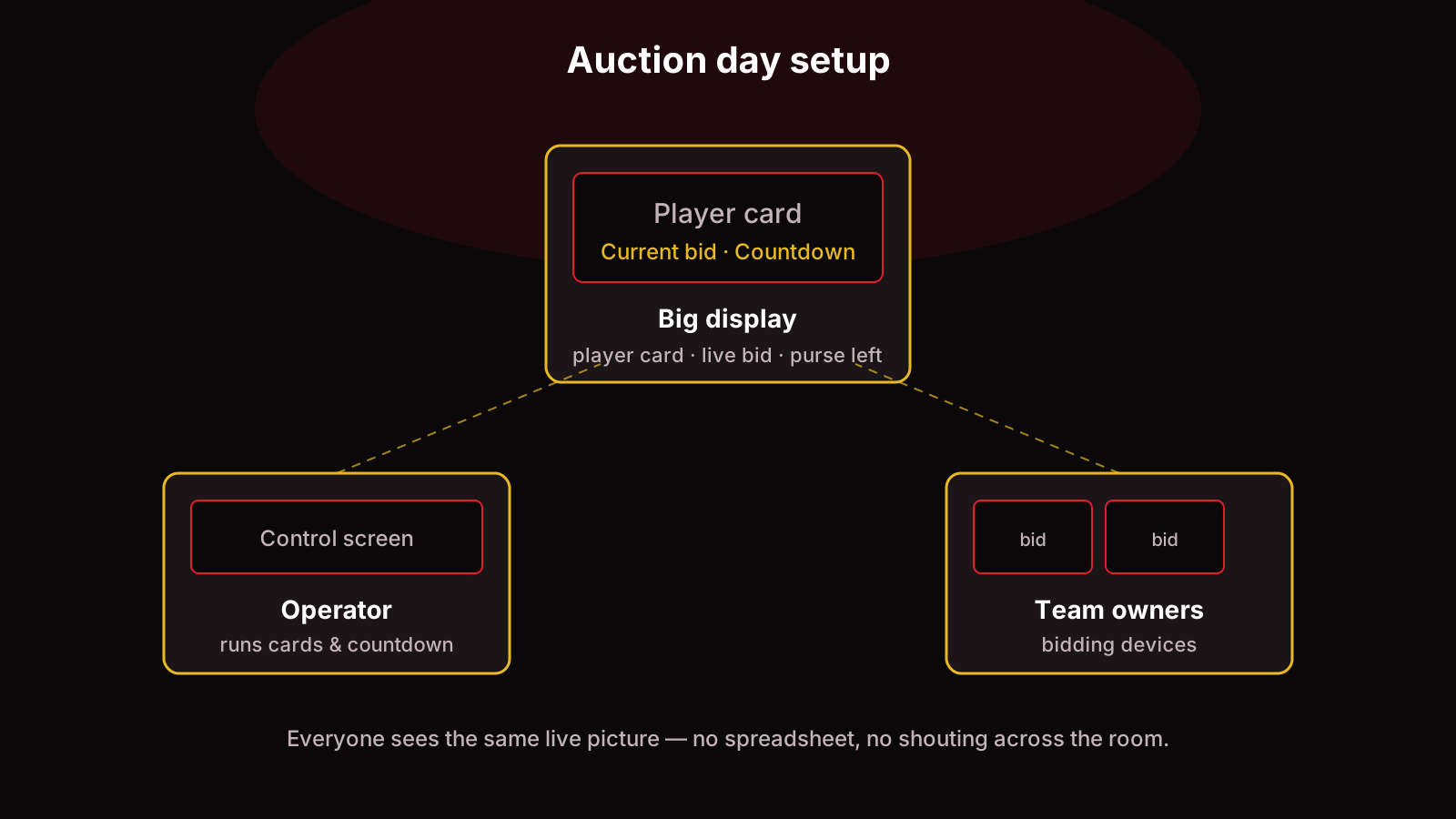
The operator's job is pace: keep each player to 1–2 minutes, don't let the room stall on unsold players (park them for round two), and keep purse indicators visible so owners always know what they have left.
Running your first auction? PowerAuction runs the whole day for you — player cards, live bidding with countdown, automatic purse math, and owner dashboards. No spreadsheet, no shouting across the room.
What happens after the last player is sold?
- Publish final squads — every team's players, total spent, and remaining purse. Transparency here prevents a week of arguments.
- Collect payments against the winning bids, on the deadline you announced.
- Share the numbers: total bids, highest bid, average price, unsold players. Owners love this, and it builds hype for next season.
- Handle the unsold list per your round-two rule, or release those players.
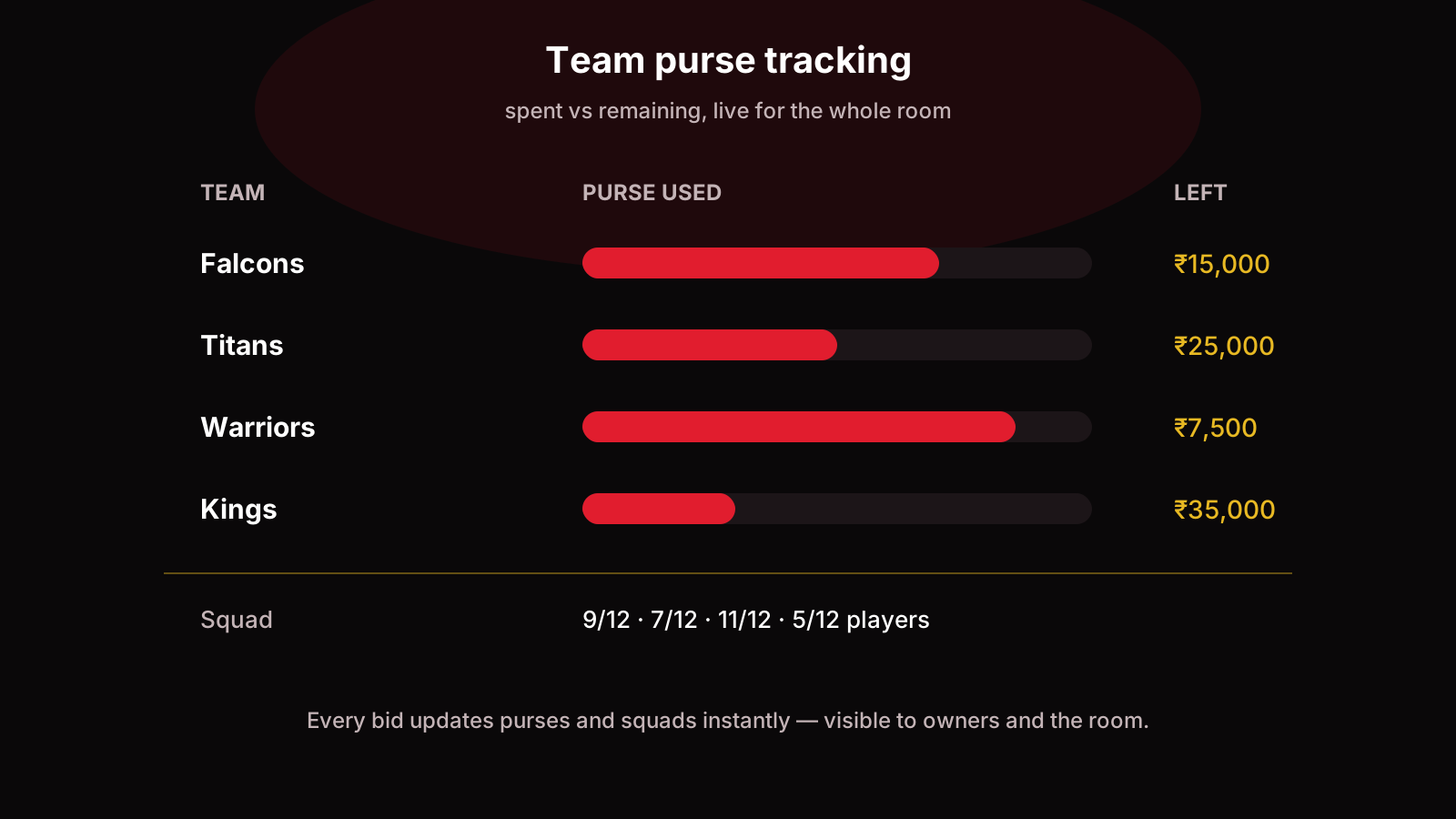
Track every figure — bids, purse spent vs remaining, squad lists — in one dashboard. Manage the squads through the season.
Common mistakes first-time organizers make
- No written rules. Verbal agreements evaporate the moment money is involved.
- Purse too large. If everyone can afford everyone, there's no tension and no fun.
- Skipping approvals. Fake or duplicate registrations corrupt the whole pool.
- No payment deadline. "Pay whenever" means "never" for at least two teams.
- Letting the organizer bid. The person running the room cannot also play in it.
- Running it on a spreadsheet + WhatsApp. It works for 20 players. At 100, bid disputes and purse errors will eat your day. This is exactly what auction software replaces.
FAQ
How many players do you need for a cricket player auction?
Enough to fill every squad with competition left over. For 8 teams × 12 players = 96 squad slots, aim for 120–140 registered players so bidding stays competitive and unsold players don't stall the day.
How long does a player auction take?
Budget 1–2 minutes per player. 120 players = 3–4 hours including breaks. Keep unsold players for a fast second round rather than letting the room stall.
Can you run a player auction online?
Yes. Owners join from their phones, the operator runs the player cards and countdown from a control screen, and everyone sees the same live bid and purse figures. You lose the hall atmosphere but gain zero logistics.
What is the difference between a player auction and a draft?
In an auction, teams bid against each other with a purse as the limit. In a draft, teams take turns picking in a fixed order with no money involved. Auctions create price discovery; drafts are faster and simpler.
How do you handle unsold players?
Decide before the day: either a second round at a reduced base price, or they're out. Never invent the rule mid-auction.
Do you need software to run a player auction?
Not for a tiny event — paper slips work for 20 players. Past ~50 players, bid tracking, purse math, and the live display become error-prone by hand, which is when organizers switch to software. See how PowerAuction runs it.
Running a tournament soon? Set up your player auction on PowerAuction — registration, live bidding, purses, and squads in one place.